Note
Click here to download the full example code
Simulating a Control-Bounded ADC
This example shows how to simulate the interactions between an analog system and a digital control while the former is excited by an analog signal.
 8 import matplotlib.pyplot as plt
 9 import cbadc
10 import numpy as np
The Analog System
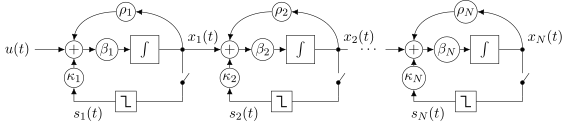
First, we have to decide on an analog system. For this tutorial, we will
commit to a chain-of-integrators ADC,
see cbadc.analog_system.ChainOfIntegrators, as our analog
system.
26 # We fix the number of analog states.
27 N = 6
28 # Set the amplification factor.
29 beta = 6250.
30 rho = - 1e-2
31 kappa = - 1.0
32 # In this example, each nodes amplification and local feedback will be set
33 # identically.
34 betaVec = beta * np.ones(N)
35 rhoVec = betaVec * rho
36 kappaVec = kappa * beta * np.eye(N)
37
38 # Instantiate a chain-of-integrators analog system.
39 analog_system = cbadc.analog_system.ChainOfIntegrators(betaVec, rhoVec, kappaVec)
40 # print the analog system such that we can very it being correctly initalized.
41 print(analog_system)
Out:
The analog system is parameterized as:
A =
[[ -62.5    0.     0.     0.     0.     0. ]
 [6250.   -62.5    0.     0.     0.     0. ]
 [   0.  6250.   -62.5    0.     0.     0. ]
 [   0.     0.  6250.   -62.5    0.     0. ]
 [   0.     0.     0.  6250.   -62.5    0. ]
 [   0.     0.     0.     0.  6250.   -62.5]],
B =
[[6250.]
 [   0.]
 [   0.]
 [   0.]
 [   0.]
 [   0.]],
CT =
[[1. 0. 0. 0. 0. 0.]
 [0. 1. 0. 0. 0. 0.]
 [0. 0. 1. 0. 0. 0.]
 [0. 0. 0. 1. 0. 0.]
 [0. 0. 0. 0. 1. 0.]
 [0. 0. 0. 0. 0. 1.]],
Gamma =
[[-6250.    -0.    -0.    -0.    -0.    -0.]
 [   -0. -6250.    -0.    -0.    -0.    -0.]
 [   -0.    -0. -6250.    -0.    -0.    -0.]
 [   -0.    -0.    -0. -6250.    -0.    -0.]
 [   -0.    -0.    -0.    -0. -6250.    -0.]
 [   -0.    -0.    -0.    -0.    -0. -6250.]],
Gamma_tildeT =
[[1. 0. 0. 0. 0. 0.]
 [0. 1. 0. 0. 0. 0.]
 [0. 0. 1. 0. 0. 0.]
 [0. 0. 0. 1. 0. 0.]
 [0. 0. 0. 0. 1. 0.]
 [0. 0. 0. 0. 0. 1.]], and D=[[0.]
 [0.]
 [0.]
 [0.]
 [0.]
 [0.]]
The Digital Control
In addition to the analog system, our simulation will require us to specify a
digital control. For this tutorial, we will use
cbadc.digital_control.DigitalControl.
51 # Set the time period which determines how often the digital control updates.
52 T = 1.0/(2 * beta)
53 # Set the number of digital controls to be same as analog states.
54 M = N
55 # Initialize the digital control.
56 digital_control = cbadc.digital_control.DigitalControl(T, M)
57 # print the digital control to verify proper initialization.
58 print(digital_control)
Out:
The Digital Control is parameterized as:
T = 8e-05,
M = 6, and next update at
t = 8e-05
The Analog Signal
The final and third component of the simulation is an analog signal.
For this tutorial, we will choose a
cbadc.analog_signal.Sinusodial. Again, this is one of several
possible choices.
70 # Set the peak amplitude.
71 amplitude = 0.5
72 # Choose the sinusodial frequency via an oversampling ratio (OSR).
73 OSR = 1 << 9
74 frequency = 1.0 / (T * OSR)
75
76 # We also specify a phase an offset these are hovewer optional.
77 phase = np.pi / 3
78 offset = 0.0
79
80 # Instantiate the analog signal
81 analog_signal = cbadc.analog_signal.Sinusodial(amplitude, frequency, phase, offset)
82 # print to ensure correct parametrization.
83 print(analog_signal)
Out:
Sinusodial parameterized as:
amplitude = 0.5,

        frequency = 24.414062499999996,
phase = 1.0471975511965976,
        and
offset = 0.0
Simulating
Next, we set up the simulator. Here we use the
cbadc.simulator.StateSpaceSimulator for simulating the
involved differential equations as outlined in
cbadc.analog_system.AnalogSystem.
 95 # Simulate for 2^18 control cycles.
 96 end_time = T * (1 << 18)
 97
 98 # Instantiate the simulator.
 99 simulator = cbadc.simulator.StateSpaceSimulator(analog_system, digital_control, [
100                                 analog_signal], t_stop=end_time)
101 # Depending on your analog system the step above might take some time to
102 # compute as it involves precomputing solutions to initial value problems.
103
104 # Let's print the first 20 control decisions.
105 index = 0
106 for s in simulator:
107     if (index > 19):
108         break
109     print(f"step:{index} -> s:{np.array(s)}")
110     index += 1
111
112 # To verify the simulation parametrization we can
113 print(simulator)
Out:
step:0 -> s:[0 0 0 0 0 0]
step:1 -> s:[ True  True  True  True  True  True]
step:2 -> s:[False False False False False False]
step:3 -> s:[ True  True False False False False]
step:4 -> s:[ True False  True  True  True  True]
step:5 -> s:[ True  True  True False False False]
step:6 -> s:[False  True False  True  True False]
step:7 -> s:[ True False  True False False  True]
step:8 -> s:[ True  True False  True  True False]
step:9 -> s:[False False  True False False  True]
step:10 -> s:[ True  True False  True  True  True]
step:11 -> s:[ True  True  True  True  True False]
step:12 -> s:[ True  True  True False False  True]
step:13 -> s:[False False False  True  True False]
step:14 -> s:[ True  True  True False False False]
step:15 -> s:[ True  True False  True  True  True]
step:16 -> s:[ True False  True False False False]
step:17 -> s:[False  True False  True  True  True]
step:18 -> s:[ True False  True False False False]
step:19 -> s:[ True  True False  True  True  True]
t = 0.00168, (current simulator time)
Ts = 8e-05,
t_stop = 20.97152,
rtol = 1e-12,
atol = 1e-12, and
max_step = 0.0008
Tracking the Analog State Vector
Clearly the output type of the generator simulator above is the sequence of control signals s[k]. Sometimes we are interested in also monitoring the internal states of analog system during simulation.
To this end we use the
cbadc.simulator.StateSpaceSimulator.state_vector() and an
cbadc.simulator.extended_simulation_result().
Note that the cbadc.simulator.extended_simulation_result() is
defined like this
def extended_simulation_result(simulator):
    for control_signal in simulator:
        analog_state = simulator.state_vector()
        yield {
            'control_signal': np.array(control_signal),
            'analog_state': np.array(analog_state)
        }
So, in essence, we are creating a new generator from the old with an extended output.
Note
The convenience function extended_simulation_result is one of many
such convenience functions found in the
cbadc.simulator module.
We can achieve this by appending yet another generator to the control signal stream as:
150 # Repeating the steps above we now get for the following
151 # ten control cycles.
152
153 ext_simulator = cbadc.simulator.extended_simulation_result(simulator)
154 for res in ext_simulator:
155     if (index > 29):
156         break
157     print(
158         f"step:{index} -> s:{res['control_signal']}, x:{res['analog_state']}")
159     index += 1
Out:
step:20 -> s:[False False False  True  True  True], x:[ 0.54823676  0.11670772  0.06484886 -0.46198389 -0.49102059 -0.40805816]
step:21 -> s:[ True  True  True False False False], x:[ 0.28852725 -0.17409673 -0.44326189 -0.04946166 -0.10665263 -0.06475268]
step:22 -> s:[ True False False False False False], x:[0.03084446 0.4050305  0.12088599 0.35734476 0.45783109 0.51372668]
step:23 -> s:[ True  True  True  True  True  True], x:[-0.22485823 -0.14425853 -0.30835322 -0.17870188  0.01002193  0.13999125]
step:24 -> s:[False False False False  True  True], x:[ 0.51887684  0.42881669  0.24768117  0.29413072 -0.47129112 -0.48446692]
step:25 -> s:[ True  True  True  True False False], x:[ 0.2620199   0.12253093 -0.10960284 -0.16543741  0.0691172  -0.07384136]
step:26 -> s:[ True  True False False  True False], x:[ 0.00702877 -0.30986756  0.34809793  0.40279176 -0.38008514  0.33569678]
step:27 -> s:[ True False  True  True False  True], x:[-0.24614276  0.13067341 -0.19163271 -0.06832894  0.21496668 -0.19582836]
step:28 -> s:[False  True False False  True False], x:[ 0.4999634  -0.30514404  0.24888015  0.45427751 -0.19748233  0.2971895 ]
step:29 -> s:[ True False  True  True False  True], x:[ 0.24531795  0.38086046 -0.2266544  -0.05565045  0.41130859 -0.13881065]
Saving to File
In general, simulating the analog system and digital control interaction is a computationally much more intense procedure compared to the digital estimation step. This is one reason, and there are more, why you would want to store the intermediate control signal sequence to a file.
For this purpose use the
cbadc.utilities.control_signal_2_byte_stream() and
cbadc.utilities.write_byte_stream_to_file() functions.
178 # Instantiate a new simulator and control.
179 simulator = cbadc.simulator.StateSpaceSimulator(analog_system, digital_control, [
180                                 analog_signal], t_stop=end_time)
181
182 # Construct byte stream.
183 byte_stream = cbadc.utilities.control_signal_2_byte_stream(simulator, M)
184
185
186 def print_next_10_bytes(stream):
187     global index
188     for byte in stream:
189         if (index < 40):
190             print(f"{index} -> {byte}")
191             index += 1
192         yield byte
193
194
195 cbadc.utilities.write_byte_stream_to_file("sinusodial_simulation.adcs",
196                           print_next_10_bytes(byte_stream))
Out:
30 -> b'\x13'
31 -> b'\x13'
32 -> b'\x13'
33 -> b'\x13'
34 -> b'\x13'
35 -> b'\x13'
36 -> b'\x13'
37 -> b'\x13'
38 -> b'\x13'
39 -> b'\x13'
Evaluating the Analog State Vector in Between Control Signal Samples
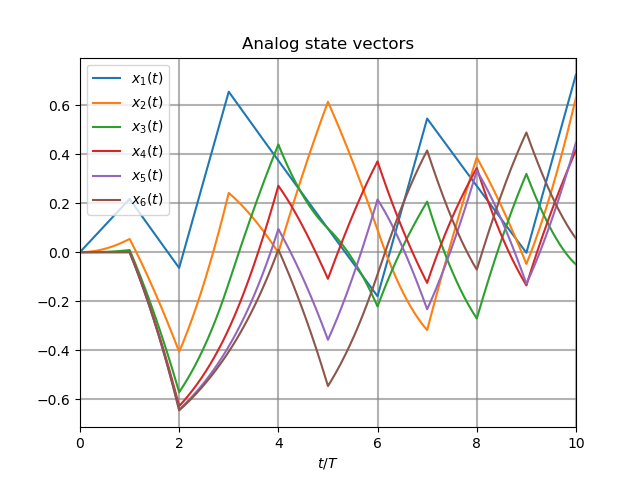
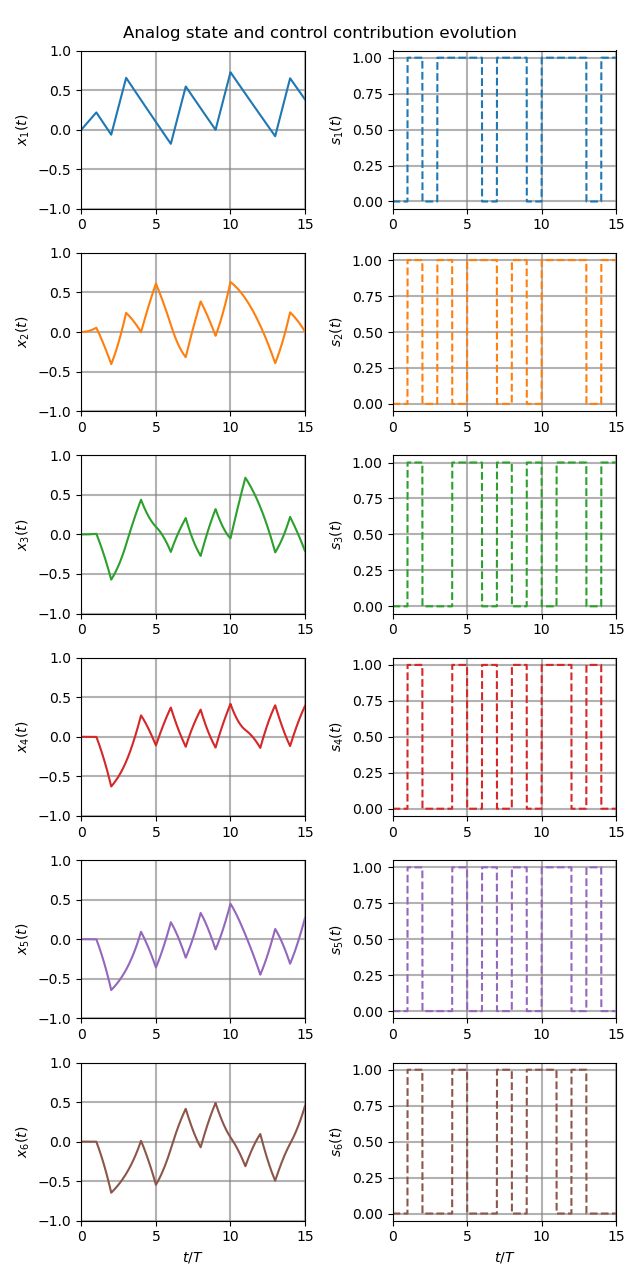
If we wish to simulate the analog state vector trajectory between
control updates, this can be achieved using the Ts parameter of the
cbadc.simulator.StateSpaceSimulator. Technically you can scale
\(T_s = T / \alpha\) for any positive number \(\alpha\). For such a
scaling, the simulator will generate \(\alpha\) more control signals per
unit of time. However, digital control is still restricted to only update
the control signals at multiples of \(T\).
211 # Set sampling time three orders of magnitude smaller than the control period
212 Ts = T / 1000.0
213
214 # Simulate for 10000 control cycles.
215 size = 15000
216 end_time = size * Ts
217
218 # Initialize a new digital control.
219 new_digital_control = cbadc.digital_control.DigitalControl(T, M)
220
221 # Instantiate a new simulator with a sampling time.
222 simulator = cbadc.simulator.StateSpaceSimulator(analog_system, new_digital_control, [
223                                 analog_signal], t_stop=end_time, Ts=Ts)
224
225 # Create data containers to hold the resulting data.
226 time_vector = np.arange(size) * Ts / T
227 states = np.zeros((N, size))
228 control_signals = np.zeros((M, size), dtype=np.int8)
229
230 # Iterate through and store states and control_signals.
231 for index, res in enumerate(cbadc.simulator.extended_simulation_result(simulator)):
232     states[:, index] = res['analog_state']
233     control_signals[:, index] = res['control_signal']
234
235 # Plot all analog state evolutions.
236 plt.figure()
237 plt.title("Analog state vectors")
238 for index in range(N):
239     plt.plot(time_vector, states[index, :], label=f"$x_{index + 1}(t)$")
240 plt.grid(b=True, which='major', color='gray', alpha=0.6, lw=1.5)
241 plt.xlabel('$t/T$')
242 plt.xlim((0, 10))
243 plt.legend()
244
245 # reset figure size and plot individual results.
246 plt.rcParams['figure.figsize'] = [6.40, 6.40 * 2]
247 fig, ax = plt.subplots(N, 2)
248 for index in range(N):
249     color = next(ax[0, 0]._get_lines.prop_cycler)['color']
250     ax[index, 0].grid(b=True, which='major', color='gray', alpha=0.6, lw=1.5)
251     ax[index, 1].grid(b=True, which='major', color='gray', alpha=0.6, lw=1.5)
252     ax[index, 0].plot(time_vector, states[index, :], color=color)
253     ax[index, 1].plot(time_vector, control_signals[index, :],
254                       '--', color=color)
255     ax[index, 0].set_ylabel(f"$x_{index + 1}(t)$")
256     ax[index, 1].set_ylabel(f"$s_{index + 1}(t)$")
257     ax[index, 0].set_xlim((0, 15))
258     ax[index, 1].set_xlim((0, 15))
259     ax[index, 0].set_ylim((-1, 1))
260 fig.suptitle("Analog state and control contribution evolution")
261 ax[-1, 0].set_xlabel("$t / T$")
262 ax[-1, 1].set_xlabel("$t / T$")
263 fig.tight_layout()
Analog State Statistics
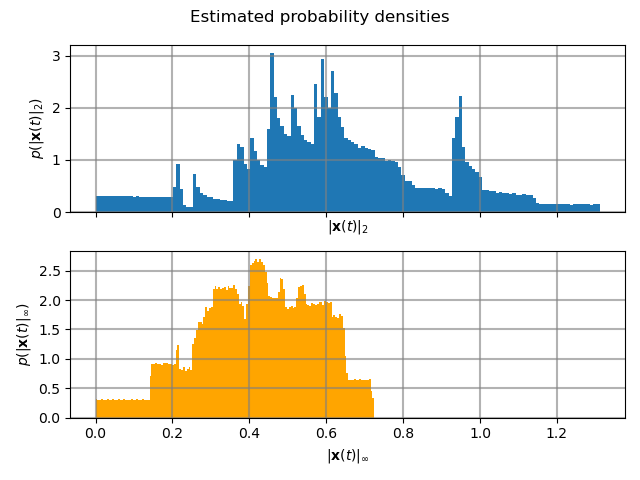
As in the previous section, visualizing the analog state trajectory is a good way of identifying problems and possible errors. Another way of making sure that the analog states remain bounded is to estimate their corresponding densities (assuming i.i.d samples).
274 # Compute L_2 norm of analog state vector.
275 L_2_norm = np.linalg.norm(states, ord=2, axis=0)
276 # Similarly, compute L_infty (largest absolute value) of the analog state
277 # vector.
278 L_infty_norm = np.linalg.norm(states, ord=np.inf, axis=0)
279
280 # Estimate and plot densities using matplotlib tools.
281 bins = 150
282 plt.rcParams['figure.figsize'] = [6.40, 4.80]
283 fig, ax = plt.subplots(2, sharex=True)
284 ax[0].grid(b=True, which='major', color='gray', alpha=0.6, lw=1.5)
285 ax[1].grid(b=True, which='major', color='gray', alpha=0.6, lw=1.5)
286 ax[0].hist(L_2_norm, bins=bins, density=True)
287 ax[1].hist(L_infty_norm, bins=bins, density=True, color="orange")
288 plt.suptitle("Estimated probability densities")
289 ax[0].set_xlabel("$\|\mathbf{x}(t)\|_2$")
290 ax[1].set_xlabel("$\|\mathbf{x}(t)\|_\infty$")
291 ax[0].set_ylabel("$p ( \| \mathbf{x}(t) \|_2 ) $")
292 ax[1].set_ylabel("$p ( \| \mathbf{x}(t) \|_\infty )$")
293 fig.tight_layout()
Total running time of the script: ( 11 minutes 39.103 seconds)